


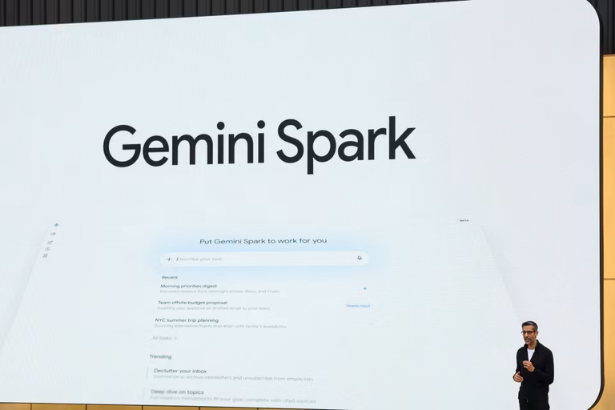
Gemini Spark Mac is reshaping how users interact with their desktops by bringing Google’s agentic assistant directly to macOS. This launch marks a significant step forward in integrating AI productivity tools with traditional desktop environments. Google is enabling users to manage local files, automate tasks, and synchronize with popular apps like Google Tasks and Google Keep. It’s a move that promises to redefine efficiency for Mac users.
Gemini Spark Mac: What It offers
At its core, Gemini Spark Mac is designed to streamline file management and task automation. The AI agent smoothly integrates with macOS, allowing users to manipulate local files directly from their desktops. This functionality is a shift for those who rely heavily on file organization and swift data processing. For instance, users can sort PDFs into subfolders or extract data from invoices to construct Google Workspace spreadsheets, all from the comfort of their Mac.
Moreover, the integration with Google Tasks and Google Keep extends Gemini Spark’s utility beyond mere file management. By connecting these applications, the assistant helps create a cohesive productivity ecosystem. This means tasks and reminders can be managed efficiently without having to switch between devices or platforms. It’s a unified approach that promises to cut down on time spent managing different applications.
Future updates are set to enhance this functionality even further. Users will soon have the ability to assign multi-step tasks to Gemini Spark from their phones, pushing boundaries in cross-device automation. It’s a promising prospect for anyone looking to synchronize their workflow across both mobile and desktop environments. So what changes for consumers? More seamless task management and less friction in daily routines.
Integration with Google Workspace
Gemini Spark’s integration with Google Workspace is another key feature that offers a tangible boost to productivity for Mac users. By enabling users to create and edit Google Workspace spreadsheets directly on their desktops, Google is leveraging the power of its ecosystem to enhance user experience. This capability allows for a more streamlined workflow, as users no longer need to rely solely on cloud-based applications to manage their data.
The potential uses for this integration are vast. Imagine pulling figures from a locally saved invoice to automatically update a budget spreadsheet. This kind of automation not only saves time but also reduces the risk of human error, ensuring greater accuracy in data management. It’s an example of how AI can effectively handle mundane tasks, freeing users to focus on more strategic endeavors.
Control over folder access is another critical aspect of Gemini Spark’s integration with Google Workspace. Users can decide which folders are accessible, maintaining a level of privacy and security that’s crucial in today’s digital age. This feature ensures that sensitive information remains protected, addressing one of the primary concerns of AI integration in personal computing. With privacy controls in place, are the benefits of AI-enhanced productivity worth potential risks? For many, the answer will be a resounding yes.
Privacy and Security Considerations
Privacy and security concerns often accompany discussions around AI and technology. With Gemini Spark Mac, Google has made privacy a priority by allowing users to control folder access. This feature is a direct response to user demands for security when integrating AI with personal computing environments. By providing these controls, Google ensures that users can confidently use Gemini Spark without unwarranted exposure to data breaches.
Temporary backup files are created during operations, adding an extra layer of security for users wary of data loss. This measure signifies Google’s commitment to safeguarding user data while maintaining the convenience of AI-powered task management. It’s a delicate balance between privacy and functionality that Google appears to be handling adeptly.
Security-conscious users will appreciate the transparency in how Gemini Spark operates. With user control over data access, there’s a sense of empowerment that’s not always present in AI tools. Does that make the price tag worth it? For those in need of efficient, secure, and powerful productivity tools, it likely does.
Practical Applications for Everyday Users
Gemini Spark Mac isn’t just for tech enthusiasts; it’s built for anyone looking to improve their daily productivity. The ability to manage and modify files directly on the desktop opens up numerous possibilities. Everyday tasks, such as organizing files, updating schedules, and managing reminders can now be automated, reducing the manual workload on users.
For professionals handling multiple projects, the integration with Google’s apps ensures that vital information is always up-to-date. Whether you’re preparing for a meeting or sorting through client files, Gemini Spark’s capabilities bring efficiency right to your fingertips. The assistant acts as a reliable partner, minimizing the time spent on repetitive tasks.
Yet, the question remains: is there a limit to what Gemini Spark can automate? The future updates promise even more capabilities, hinting at a future where even complex workflows can be managed through simple commands. For many, this points to an exciting evolution in personal computing.
Prospective Future Updates
Google has outlined a promising roadmap for Gemini Spark, with future updates expected to expand its functionality considerably. Allowing users to initiate multi-step tasks from their phones and have them executed on their desktop is a prime example. This kind of cross-device functionality will be invaluable for users seeking to maximize productivity while on the go.
These updates will also likely strengthen the integration with other Google services, making Gemini Spark an indispensable tool for those entrenched in Google’s ecosystem. The idea is to create a seamless experience where devices and applications work in harmony without user intervention.
However, as with any technology, the effectiveness of these updates will depend on their execution and user adoption. Will users embrace this new level of automation, or will skepticism about AI’s role in personal computing prevail? Only time will tell, but recent trends suggest a growing openness to AI-driven solutions.
Broader Implications
The launch of Gemini Spark Mac could have broader implications for the tech industry. It signifies a shift towards integrating AI more deeply into consumer technology, reflecting an increasing demand for intelligent, automated solutions. As AI continues to evolve, we can expect it to play a more prominent role in personal and professional productivity.
This trend is not isolated to Google alone. Across the tech landscape, companies are exploring ways to integrate AI into their products and services. From rapid image generation using Google’s Nano Banana 2 Lite to mobile app innovations, the push towards smarter technology is relentless. The Tech Marketer has covered these developments extensively, highlighting the widespread impact of AI across different sectors.
As such, the release of Gemini Spark on Mac is a microcosm of a larger movement. It’s a testament to the growing importance of AI in reshaping how we interact with technology daily. For those following tech trends, these developments offer a glimpse into the future of digital interaction.
Latest Updates
According to TechCrunch, the launch of Gemini Spark on macOS is a significant step forward for AI integration in traditional computing environments. TechCrunch emphasizes the agent’s ability to manage local files and integrate with apps like Google Tasks and Keep.
MacRumors provides insight into how the assistant helps automate tasks involving local files, demonstrating its utility in daily operations. The article also notes the potential for initiating tasks from mobile devices, enhancing cross-platform functionality.
Google Support offers detailed guidance on using Gemini Spark on Mac, ensuring users understand how to harness its full capabilities. This includes specifics on privacy controls and the creation of temporary backup files during operations.
FAQ
What is Gemini Spark Mac?
Gemini Spark Mac is Google’s AI assistant designed for macOS, allowing users to manage and automate local files and tasks directly from their desktops. It integrates with Google apps like Tasks and Keep to enhance productivity.
How does Gemini Spark Mac enhance productivity?
By automating routine tasks such as organizing files and creating Google Workspace spreadsheets, Gemini Spark Mac reduces manual workload and ensures seamless integration of Google apps into daily workflows.
Is Gemini Spark Mac secure?
Yes, it offers privacy controls by allowing users to select which folders the AI agent can access. Additionally, temporary backup files are created during operations to safeguard data and ensure security.
Can I control Gemini Spark Mac from my phone?
While full control from mobile devices is not yet available, future updates are expected to allow users to assign multi-step tasks to Gemini Spark from their phones, enhancing cross-device functionality.
What are the implications of Gemini Spark Mac for the tech industry?
The launch represents a broader trend towards integrating AI into consumer technology, reflecting an increasing demand for intelligent solutions in personal and professional productivity, as reported by various tech outlets.
Sources and References
TechCrunch: Gemini Spark, Google’s Agentic Assistant, Is Now Available on Mac
MacRumors: Google’s Gemini Spark Comes to Mac
Google Support: How to Use Gemini Spark on Mac