


Microsoft quietly gives users control over the MSN feed in Windows widgets
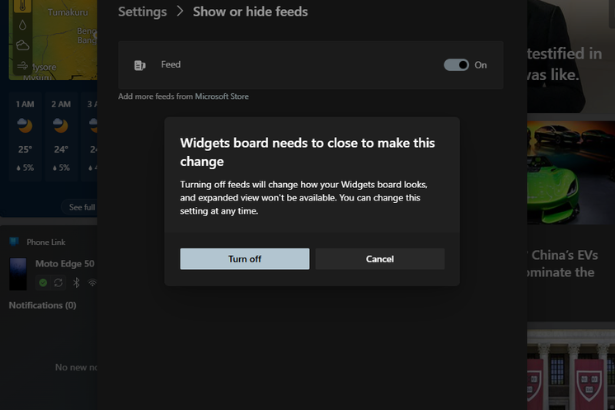
The Microsoft MSN feed Windows widgets experience is finally getting a long-awaited fix. In a subtle but meaningful update, Microsoft is now allowing users to disable the MSN-powered news feed inside the Windows 11 widgets panel, addressing one of the most persistent complaints about the feature.
For years, the widgets board has been less about productivity and more about clutter, packed with headlines many users never asked for. That’s starting to change.
Background and Context
When Windows 11 launched, Microsoft positioned widgets as a personalized dashboard. Weather, calendar updates, and to-do lists were supposed to sit alongside curated news from MSN.
In reality, the experience leaned heavily toward content consumption. The MSN feed dominated the interface, often overshadowing useful widgets. Users couldn’t fully remove it, which made the feature feel more like a news portal than a productivity tool.
This approach mirrored Microsoft’s broader strategy of embedding content ecosystems into its software. Similar integrations exist in Edge and Bing, where news and recommendations are tightly woven into the experience.
Latest Update: What’s Changed
According to reporting from The Verge, Microsoft is now testing an option that lets users hide the MSN feed entirely within the widgets panel.
Here’s what that means in practice:
- Users can toggle off the news feed
- Widgets become the primary focus of the panel
- The interface feels cleaner and more utility-driven
This change is currently rolling out in testing phases, but it signals a clear shift in Microsoft’s design priorities. Instead of pushing content, the company is giving users control over what they see.
Importantly, this isn’t just a visual tweak. It fundamentally changes how the widgets panel functions, turning it from a hybrid news hub into something closer to its original promise.
Expert Insights and Analysis
This move reflects a broader trend across tech platforms. Users are increasingly pushing back against forced content feeds, especially when they interrupt workflows.
Microsoft’s initial widgets strategy leaned into engagement metrics. News feeds drive clicks, and clicks drive ad revenue. But that approach came at the cost of usability.
By allowing the MSN feed to be disabled, Microsoft is acknowledging a key reality: not every surface needs to be monetized through content.
It also aligns with growing competition in operating systems and productivity ecosystems. Platforms like macOS and ChromeOS prioritize minimalism and user control. Microsoft’s adjustment suggests it’s paying attention.
Broader Implications
For Windows Users
This update could dramatically improve how people use widgets. Without the distraction of news headlines, the panel becomes more practical:
- Quick-glance productivity tools
- Cleaner interface
- Less cognitive overload
For Microsoft’s Strategy
The decision hints at a shift away from aggressive content integration. While MSN remains part of Microsoft’s ecosystem, it may no longer dominate user-facing surfaces.
For deeper analysis on platform strategy shifts, this topic fits alongside broader coverage on https://www.thetechmarketer.com/ around UI design and ecosystem control.
For the Industry
If successful, this could influence other platforms to rethink embedded feeds. Users are signaling a clear preference for choice over curation.
Related History: Microsoft’s Long Relationship With Feeds
This isn’t the first time Microsoft has embedded content into its products:
- Windows 10’s live tiles included news snippets
- Microsoft Edge integrates MSN content on the homepage
- Bing heavily promotes curated news and trends
The widgets panel was simply the latest iteration. What’s different now is the willingness to step back.
What Happens Next
The feature is still rolling out in testing builds, but a wider release is likely if feedback remains positive.
Key things to watch:
- Whether Microsoft expands customization further
- If third-party widgets gain more prominence
- How MSN content is repositioned across Windows
There’s also a bigger question: will Microsoft continue reducing friction in other areas of Windows, or is this a one-off concession?
Conclusion
The Microsoft MSN feed Windows widgets update may seem minor on the surface, but it represents a meaningful shift in philosophy. By letting users disable the news feed, Microsoft is prioritizing usability over engagement metrics.
It’s a small change with outsized impact. And for many users, it finally makes widgets worth using.
FAQ
What is the Microsoft MSN feed in Windows widgets?
The MSN feed is a news and content stream integrated into the Windows 11 widgets panel, powered by Microsoft’s MSN platform.
Can I disable the Microsoft MSN feed Windows widgets feature?
Yes, Microsoft is introducing an option that allows users to hide the MSN feed entirely, leaving only widgets visible.
Why did Microsoft include the MSN feed in widgets?
The feed was designed to increase engagement and provide personalized news, but many users found it intrusive.
Is the update available to everyone?
Not yet. It is currently rolling out in testing builds and should expand to more users soon.
Does this improve Windows 11 usability?
Yes. Removing the feed makes the widgets panel cleaner and more focused on productivity tools.
Sources & References
- The Verge – Microsoft is finally letting you hide the MSN feed in Windows widgets – https://www.theverge.com/news/923884/microsoft-hide-msn-feed-windows-widgets
- Microsoft Windows Blog – Windows 11 Widgets Overview – https://blogs.windows.com
- TechCrunch – Microsoft Windows 11 feature updates and UI changes – https://techcrunch.com
GOOGLE TRENDS SECTION
Trend Insight: Rising searches around Windows customization and widget control
Suggested Trend Image:
“Google Trends graph showing spike in searches for Windows widgets customization and MSN feed removal”
Trending Keywords/Tags:
- Windows 11 widgets
- Microsoft MSN feed
- disable widgets news
- Windows personalization
- Microsoft UI update
Reference Links: