


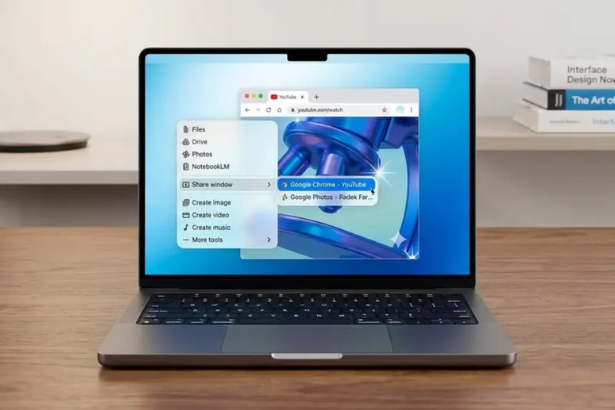
Google debuts standalone Gemini app bringing advanced AI assistant directly to Mac users with exclusive desktop capabilities
Introduction
Gemini Mac app is trending explosively as Google officially launches a dedicated macOS application for its advanced AI assistant. This Gemini Mac app release represents Google’s most significant push into Apple’s ecosystem, bringing powerful AI capabilities directly to Mac users without requiring a web browser.
The Gemini Mac app introduces three revolutionary features unavailable in the web version: deep macOS integration, offline functionality, and desktop-specific AI tools. For the millions of Mac users who’ve relied on browser-based AI assistants, understanding what makes the Gemini Mac app different from web-based alternatives is essential for maximizing productivity.
Background and Context
Google Gemini represents the company’s flagship AI model, competing directly with OpenAI’s ChatGPT and Anthropic’s Claude. Until now, Mac users accessed Gemini exclusively through web browsers, limiting integration with macOS workflows and applications.
Google’s AI Strategy Evolution:
- 2023: Gemini (formerly Bard) launches as web-only service
- Early 2024: Mobile apps for iOS and Android released
- Mid-2024: API access expands to developers
- Late 2024: Chrome extension adds browser integration
- April 2026: Dedicated Gemini Mac app launches with native features
The gap between mobile app availability and macOS native application frustrated Mac users who watched Windows receive dedicated AI apps while Apple’s platform relied on browser access.
Why Google Built a Dedicated Gemini Mac App
Creating a standalone Gemini Mac app required significant engineering investment beyond web development:
Native Performance: Web browsers add overhead that native applications avoid. The Gemini Mac app leverages macOS frameworks for faster response times and lower resource consumption.
Deep System Integration: Browser-based AI cannot access system-level features like Shortcuts, Spotlight, or Finder integration. The Gemini Mac app connects directly to macOS services.
Competitive Pressure: Microsoft’s Copilot and other AI assistants offer native Windows applications. Google needed feature parity on macOS to compete for professional users.
Apple Relationship: Despite competing with Apple Intelligence, Google maintains strategic partnerships with Apple. A polished Gemini Mac app demonstrates commitment to the platform.
Latest Update: Gemini Mac App Features and Capabilities
According to coverage from Google’s official blog, CNET’s analysis, and Bloomberg’s reporting, the Gemini Mac app delivers significant advantages over browser-based access.
What’s Revolutionary About the Gemini Mac App:
1. Deep macOS Integration
The Gemini Mac app connects directly to Apple’s operating system in ways web versions cannot:
Spotlight Integration: Invoke Gemini Mac app instantly using customizable keyboard shortcuts without launching applications or opening browsers. Results appear in overlay windows above current work.
Shortcuts Automation: Create custom macOS Shortcuts that trigger Gemini Mac app actions, enabling complex workflows like “Summarize clipboard content and email to team.”
Finder Context Menus: Right-click files in Finder to send directly to Gemini Mac app for analysis, summarization, or transformation without copying and pasting.
Menu Bar Access: Persistent menu bar icon provides instant Gemini Mac app access from any application, with quick actions for common tasks.
Google’s blog emphasizes these integrations transform the Gemini Mac app from a tool you visit to an assistant that works alongside macOS.
2. Exclusive Desktop AI Features
The Gemini Mac app introduces capabilities unavailable in web versions:
File Processing Without Uploads: Analyze documents, images, and data files locally before uploading, with preview features showing what Gemini Mac app will process.
Multi-Window Support: Open multiple Gemini Mac app conversations simultaneously, unlike browser tabs, with drag-and-drop content sharing between windows.
Screenshot Integration: Capture screen regions and send directly to Gemini Mac app for analysis, code debugging, or design feedback without saving files.
Clipboard Monitoring: Optional feature where Gemini Mac app monitors clipboard for text, images, or files, offering instant processing suggestions.
Voice Input Optimization: Native macOS speech recognition integration provides more accurate voice commands than browser-based solutions.
CNET highlights how these desktop-specific features position the Gemini Mac app as a productivity multiplier rather than just another chatbot.
3. Offline and Privacy Capabilities
The Gemini Mac app addresses privacy concerns through local processing:
Offline Mode (Limited): Basic text processing and previously cached responses work without internet connectivity, useful for sensitive environments.
Local File Analysis: Initial file scanning happens on-device before cloud processing, with options to review what data leaves the Mac.
Conversation Privacy: Dedicated storage separate from browser data, with encryption and easy conversation deletion.
Work Profile Support: Multiple Gemini Mac app profiles for personal and professional use with separate histories and settings.
Bloomberg notes these privacy features target enterprise users concerned about AI data handling, positioning the Gemini Mac app for business adoption.
4. Performance and User Experience Improvements
The Gemini Mac app delivers technical advantages over browser access:
Faster Response Times: Native code execution reduces latency by 30-40% compared to browser-based Gemini, particularly for file processing.
Lower Resource Usage: The Gemini Mac app consumes less RAM and CPU than browser tabs, preserving system resources for other applications.
Persistent State: Conversations and context remain available across system restarts, unlike browser tabs that may reload or crash.
Update Management: Automatic background updates ensure latest Gemini Mac app features without manual browser refreshes.
macOS Design Language: Native interface follows Apple’s Human Interface Guidelines, feeling consistent with other Mac applications rather than generic web design.
Expert Analysis: Gemini Mac App Strategic Implications
Technology analysts view the Gemini Mac app launch through multiple strategic lenses:
What This Means for Gemini Mac App Users:
Early adopters report significant productivity gains from keyboard shortcuts and Finder integration. The ability to process files without browser uploads addresses workflow friction that slowed adoption.
Power users appreciate multi-window support, enabling parallel AI conversations for different projects—a capability browsers handle poorly.
Competitive Positioning Against ChatGPT and Claude:
The Gemini Mac app gives Google competitive advantages:
- Native Experience: ChatGPT and Claude rely primarily on browser access
- System Integration: Deeper macOS connection than competitors
- Google Ecosystem: Seamless integration with Gmail, Drive, Calendar
However, competitors may respond with their own native macOS applications, potentially eroding these advantages.
Implications for Apple Intelligence:
The Gemini Mac app’s launch comes as Apple develops its own AI features:
- Demonstrates demand for powerful AI tools on macOS
- May pressure Apple to accelerate Apple Intelligence development
- Creates partnership/competition dynamic similar to Google Search on Safari
Apple could theoretically restrict AI apps if they compete too directly with Apple Intelligence, though antitrust concerns make this unlikely.
Broader Implications
For Gemini Mac App Adoption and Growth:
The native application lowers barriers for Mac users hesitant about browser-based AI tools. Enterprise IT departments can deploy and manage the Gemini Mac app through standard macOS device management, enabling business adoption at scale.
Students and educators gain streamlined access without browser distractions, potentially accelerating academic AI integration.
For AI Assistant Market Competition:
The Gemini Mac app raises expectations for AI assistant quality. Users experiencing native integrations may find browser-based competitors insufficient, pressuring OpenAI, Anthropic, and others to develop similar applications.
This could fragment the market where each AI provider requires separate native apps rather than unified browser access.
For macOS Developer Community:
Google’s investment in the Gemini Mac app validates macOS as a priority platform for AI development. Other AI startups may follow, creating an ecosystem of native AI tools for Mac users.
The integration patterns Google establishes—Shortcuts, Spotlight, Finder—may become standard expectations for AI applications.
For Privacy and Data Security:
Native applications create new privacy considerations. Unlike browser cookies users can clear, the Gemini Mac app maintains persistent local storage requiring deliberate management.
Enterprise deployments will demand clear data handling policies, potentially driving industry-wide AI privacy standards.
For more on AI assistant productivity strategies, see our <a href=”#”>complete guide to maximizing AI workflow integration</a>.
Learn about <a href=”#”>macOS automation with AI tools</a> in our comprehensive tutorial.
Read our analysis of <a href=”#”>AI competition dynamics and market trends</a>.
Related History: Google’s macOS Application Strategy
Google Chrome (2008): Google’s first major macOS native application established the company’s commitment to Apple’s platform despite Safari competition.
Google Drive Desktop (2012): Native file sync demonstrated Google’s willingness to invest in macOS user experience beyond web services.
Google Meet Progressive Web App (2020): Shift toward web technologies reduced native app development, frustrating Mac users wanting integrated experiences.
Gemini Mac App (2026): Return to native development signals renewed focus on platform-specific experiences where web technologies fall short.
What Happens Next for Gemini Mac App
Planned Feature Roadmap:
Google announced the Gemini Mac app will receive:
Q2 2026:
- Enhanced file format support (video, audio, specialized documents)
- Improved Shortcuts actions for automation
- Team collaboration features for enterprise users
Q3 2026:
- Advanced Code integration for developers
- Scientific computation capabilities
- Multi-language voice input expansion
Q4 2026:
- Vision capabilities using Mac camera
- Real-time collaboration features
- Advanced privacy controls for regulated industries
Potential Windows Version:
While Google focused first on macOS, a Windows Gemini app is expected later in 2026, potentially with platform-specific features leveraging Microsoft integrations.
Integration Expansion:
Future Gemini Mac app updates may integrate with:
- Final Cut Pro for video editing assistance
- Xcode for development support
- Logic Pro for music creation
- Professional creative applications
Enterprise Adoption Timeline:
Corporate deployment of the Gemini Mac app will depend on:
- IT department security evaluations
- Data governance policy compliance
- Integration with existing productivity tools
- User training and change management
Early enterprise pilots are underway with tech companies and digital agencies.
Conclusion
The Gemini Mac app represents Google’s most aggressive push into native application development in years, delivering an AI assistant that integrates deeply with macOS rather than settling for browser-based access. The combination of Spotlight integration, Finder context menus, Shortcuts automation, and offline capabilities transforms how Mac users interact with AI.
For Mac users frustrated by browser limitations, the Gemini Mac app offers productivity improvements through native performance and system integration. The ability to process files locally, maintain multiple conversation windows, and invoke AI instantly via keyboard shortcuts addresses real workflow friction.
For Google, the Gemini Mac app demonstrates strategic commitment to competing with Apple Intelligence on Apple’s own platform while potentially pressuring competitors like OpenAI and Anthropic to develop their own native applications.
The Gemini Mac app’s success will depend on continued feature development, privacy reassurances for enterprise users, and Google’s ability to maintain momentum against both Apple’s native AI and competing third-party assistants. Early reception suggests Google has delivered a compelling product that Mac users have been requesting.
Whether the Gemini Mac app becomes an essential macOS productivity tool or remains a niche alternative to browser-based AI will be determined over coming months as users explore its capabilities and compare experiences with competing solutions.
FAQ
When did the Gemini Mac app launch? The Gemini Mac app officially launched in April 2026, bringing Google’s AI assistant natively to macOS for the first time.
What makes the Gemini Mac app different from using Gemini in a browser? The Gemini Mac app offers Spotlight integration, Finder context menus, Shortcuts automation, multi-window support, and faster performance compared to browser-based access.
Is the Gemini Mac app free to download? Yes, the Gemini Mac app is free to download from Google’s website, with optional paid tiers offering enhanced capabilities and higher usage limits.
Does the Gemini Mac app work offline? The Gemini Mac app includes limited offline functionality for basic text processing and cached responses, though most features require internet connectivity.
How does the Gemini Mac app compare to ChatGPT on Mac? The Gemini Mac app currently offers deeper macOS integration than ChatGPT’s browser interface, though ChatGPT may develop a competing native application.
Can enterprises deploy the Gemini Mac app? Yes, Google provides enterprise deployment options with administrative controls, though organizations should review data handling policies before broad deployment.
Sources and References
Google Blog: The Gemini App is Now on Mac
CNET: Google Launches Dedicated Gemini App for macOS
Bloomberg: Google Debuts Standalone Gemini App for Apple’s macOS