

Introduction
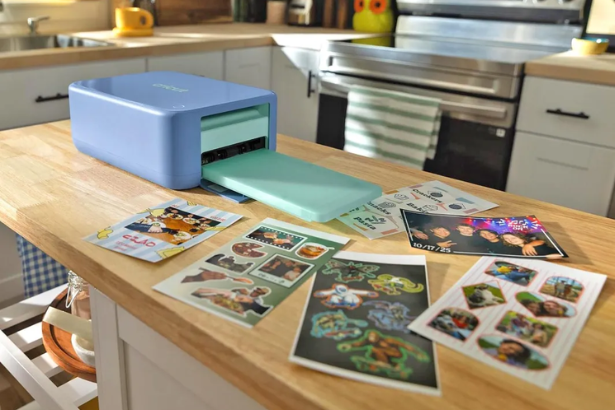
Cricut StickerPix is Cricut’s newest attempt to simplify one of the most popular home-crafting workflows: turning digital artwork, photographs, and designs into physical stickers. The company has introduced two compact machines, the StickerPix Print + Cut and the smaller StickerPix Print, both designed around printing stickers and photos without requiring a separate inkjet printer.
The larger StickerPix Print + Cut starts at $299, while the smaller StickerPix Print starts at $169. Both went on sale September 24, 2026.
What makes the launch interesting is how much of the traditional sticker-making process Cricut has squeezed into these machines.
Instead of designing something on a computer, printing it through a conventional printer, transferring it to a Cricut cutting machine, cutting it, and applying a protective laminate separately, StickerPix is designed to combine much of that workflow in one compact device.
For casual crafters, small businesses, Etsy sellers, stationery creators, and people who simply want to turn their camera roll into physical stickers, that is a meaningful change.
Background and Context
Cricut built its reputation around cutting machines that allow users to transform digital designs into physical materials.
Traditional Cricut workflows can involve several pieces of equipment.
A user might design artwork in Cricut Design Space, print the design using a separate inkjet printer, place the printed sheet on a Cricut cutting mat, and then use a compatible cutting machine to create the sticker shape.
Cricut’s existing Print Then Cut workflow still works this way. The company says compatible cutting machines require an inkjet printer, cutting machine, blade and compatible printable sticker material.
StickerPix changes that equation.
The new machines have printing built into the device, while the Print + Cut model also adds precision cutting.
That means Cricut is not simply launching another cutting machine.
It is moving further into the printing hardware market.
Latest Update: Cricut Launches StickerPix
Cricut announced StickerPix on September 24, 2026, introducing two models:
| Feature | StickerPix Print + Cut | StickerPix Print |
|---|---|---|
| Printing | Yes | Yes |
| Cutting | Yes | No |
| Sticker format | 4 x 7-inch sheets | Pre-cut sheets |
| Photo paper | 4 x 6-inch | 4 x 6-inch |
| Lamination | Built in | Built into printing process |
| Starting price | $299 | $169 |
| Main use | Print, laminate and kiss-cut | Print on pre-cut stickers |
| Size | 8 x 11.3 x 4.1 inches | 7.8 x 5 x 3.5 inches |
Cricut describes StickerPix as a new line of sticker and photo machines designed to produce stickers, labels, photo prints, cards and invitations at home.
The Verge reported that the larger machine uses a dye-sublimation printing process, while both machines incorporate lamination into the printing workflow.
Cricut StickerPix Print + Cut Is the More Capable Model
The $299 StickerPix Print + Cut is the centerpiece of the new range.
It combines three functions:
Print → Laminate → Cut
Cricut says the machine works with 4 x 7-inch Sticker Sheets and 4 x 6-inch Photo Paper.
The Verge reports that the machine uses dye-sublimation printing, a process that uses heat rather than conventional liquid ink to produce the image. The publication also notes that the built-in lamination makes the resulting prints resistant to water, scratches and fading over time.
The cutting system has an important limitation, however.
StickerPix Print + Cut creates kiss-cut stickers.
That means the machine cuts through the sticker material but leaves the backing sheet intact.
For users who want individual die-cut stickers separated completely from their backing, Cricut’s larger cutting machines remain the more flexible option.
What Is a Kiss-Cut Sticker?
A kiss cut is designed to make stickers easy to peel while keeping them attached to a larger sheet.
Think of a traditional sticker sheet.
Each sticker has been cut around its outline, but the backing paper remains one continuous piece.
That is exactly the approach StickerPix Print + Cut uses.
This differs from a die-cut sticker, where the cutting process goes completely through both the sticker material and its backing.
The distinction sounds minor, but it affects how creators package and sell stickers.
A kiss-cut sheet can be useful for:
- Sticker sheets
- Planner stickers
- Journaling
- Stationery
- Organization labels
- Small business packaging
- Decorative stickers
Die-cut stickers are often more useful when individual stickers need to be packaged or sold separately.
The Smaller Cricut StickerPix Print Costs $169
The second model is considerably smaller.
The Cricut StickerPix Print starts at $169 and removes the cutting mechanism from the Print + Cut model.
Instead, users print directly onto pre-cut sticker sheets.
Cricut says those sheets are available in several formats:
- 1.5-inch circles
- 1 x 2.6-inch rectangles
- 1.5-inch squares
- 4 x 6-inch photo paper
The machine measures 7.8 x 5 x 3.5 inches, compared with 8 x 11.3 x 4.1 inches for the Print + Cut model.
That makes the smaller machine particularly interesting for people who do not want another large crafting appliance taking up workspace.
The Real Innovation Is the Compact Design
Cricut is positioning StickerPix around convenience as much as capability.
The company says both machines are compact and designed as all-in-one devices, eliminating the need for separate tools in the printing process.
That matters because conventional Cricut sticker production can require several pieces of hardware.
A typical workflow can involve:
Design software
↓
Inkjet printer
↓
Sticker material
↓
Cricut cutting machine
↓
Cutting mat
↓
Laminate
StickerPix compresses much of that process.
For people with limited desk space, that can be as important as the actual printing technology.
No Separate Inkjet Printer Required
One of Cricut’s clearest selling points is that StickerPix does not require a conventional home inkjet printer.
Cricut’s existing printable-sticker workflow requires an inkjet printer alongside a compatible Cricut cutting machine.
StickerPix instead uses an integrated printing system.
Cricut says its new machines use built-in ink cartridges, removing the need for a separate home printer.
That could simplify the setup for first-time crafters.
It also changes the economics of the equipment.
A creator who already owns a good inkjet printer may not need the integrated printing capability as much as someone starting from scratch.
Built-In Lamination Changes the Workflow
Another major feature is the built-in protective coating.
Traditional sticker production often requires applying a separate laminate sheet after printing.
Cricut says StickerPix integrates laminate coating into the printing process.
The Verge reports that this provides resistance to water, scratches and fading.
That matters for stickers that will be handled frequently.
Think:
- Water bottles
- Journals
- Laptop stickers
- Product packaging
- Storage labels
- Planner accessories
- Decorative stationery
There is also a tradeoff.
Cricut says its traditional cutting-machine workflow can use laminate sheets in different styles, including holographic finishes. StickerPix’s integrated coating is more convenient but does not provide the same manual laminate customization described for conventional Cricut machines.
Cricut StickerPix and Design Space
StickerPix is designed to work with Cricut Design Space.
Cricut’s support documentation says StickerPix Print + Cut requires Design Space, a compatible Bluetooth-enabled device and high-speed internet connection.
The software provides several ways to start a sticker project.
Users can:
- Start from a blank canvas
- Upload their own artwork
- Choose images
- Add text
- Use patterned backgrounds
- Use templates
- Create labels
- Make photo stickers
- Use AI Create
- Apply Sticker Transformations to uploaded photos
That last feature is particularly notable.
Cricut says Sticker Transformations can turn uploaded photos into stylized sticker designs using options such as Anime, Pixel Art, Illustration and Crayon Drawing, although available styles may vary.
This connects StickerPix to the broader trend of AI-assisted consumer creativity.
AI Meets Physical Crafting
The interesting part of StickerPix is therefore not just the hardware.
It sits at the intersection of three consumer technology trends:
AI image creation
Digital design
Physical manufacturing
A user can start with a photograph, transform it with AI-assisted tools, arrange it as a sticker, and physically produce the result.
That turns generative software into something tangible.
Instead of an AI image remaining on a smartphone or computer, it can become a sticker sheet, label, card or physical print.
Cricut’s existing Design Space ecosystem is increasingly becoming the bridge between those two worlds.
Could Cricut StickerPix Become an Etsy Tool?
The Verge explicitly frames the new machines as potentially useful for people launching an Etsy shop.
That makes sense because sticker businesses have relatively low barriers to entry compared with many physical-product businesses.
A creator needs:
- Artwork
- Sticker material
- Printing equipment
- Cutting equipment
- Packaging
- An online storefront
StickerPix attempts to reduce the hardware complexity.
For a small creator, being able to produce stickers without purchasing both a printer and cutting machine could simplify the initial setup.
The $299 Print + Cut model is still a meaningful hardware purchase, however, and the cost of consumables needs to be considered before treating the device as a business investment.
The available sources do not provide enough information to calculate per-sticker production costs, so those economics should not be assumed from the machine’s purchase price alone.
The Difference Between StickerPix and Cricut’s Larger Machines
This is perhaps the most important comparison.
| Feature | StickerPix Print + Cut | Traditional Cricut cutting machine |
|---|---|---|
| Built-in printing | Yes | No |
| Separate printer required | No | Yes for Print Then Cut |
| Kiss-cut | Yes | Yes |
| Die-cut | No | Yes |
| Built-in lamination | Yes | No |
| Laminate sheets | Not required for standard process | Can be used |
| Photo printing | Yes | Requires separate printer |
| Compact design | Yes | Depends on model |
| Broader material cutting | More limited | Much broader |
Cricut itself says its conventional cutting machines can perform both die-cut and kiss-cut stickers, while StickerPix is limited to kiss cuts.
That means StickerPix is not a direct replacement for the company’s entire cutting-machine ecosystem.
It is a different category.
The Bigger Strategy Behind StickerPix
Cricut is effectively moving downstream in the crafting workflow.
Its traditional machines are primarily cutting platforms.
StickerPix introduces a compact print-and-cut platform designed around a specific high-demand use case.
That could help Cricut reach customers who do not need the broader capabilities of a Maker or Explore machine.
A customer who simply wants to turn photos into stickers does not necessarily need a machine capable of cutting fabric, wood, vinyl and dozens of other materials.
StickerPix narrows the problem.
That can make the product easier to understand.
Expert Insights and Analysis
The most significant aspect of StickerPix is arguably its workflow simplification.
The machine does not necessarily make sticker creation fundamentally more sophisticated.
It makes the process more contained.
That distinction matters.
Cricut’s existing ecosystem is powerful precisely because its machines can handle a wide range of materials and cutting techniques.
But flexibility introduces complexity.
Users have to understand printers, materials, mats, blades, calibration and cutting settings.
StickerPix targets a narrower workflow:
Design something → print it → protect it → peel the sticker.
For beginners, that simplicity can be a major advantage.
For experienced crafters, the tradeoff is reduced flexibility.
The Consumables Business Matters Too
Hardware is only one part of the StickerPix ecosystem.
The machines require specialized sticker sheets, photo paper and ink.
Cricut has created dedicated materials for the StickerPix range and maintains separate support categories for paper, ink and supplies.
That means the business model extends beyond the initial machine purchase.
This is common in consumer printing.
The device establishes the installed base.
Consumables create ongoing purchases.
For Cricut, expanding into printing could therefore create another recurring materials ecosystem alongside its existing cutting materials.
Photo Printing Makes StickerPix More Versatile
StickerPix is not limited to stickers.
Both machines can print 4 x 6-inch photographs, according to Cricut.
That expands the potential audience.
Someone might use the machine for stickers occasionally but use it for photos, cards or labels more frequently.
Cricut also provides dedicated workflows for photo prints, including single prints, photo grids and collages.
That turns StickerPix into something closer to a compact creative printer than a dedicated sticker machine.
Cards, Invitations and Labels
Cricut is also positioning the machines for other physical media.
Its StickerPix support ecosystem includes workflows for:
- Cards
- Invitations
- Labels
- Photo prints
- Decorative stickers
- Stationery stickers
- Gift labels
- Organization labels
This broader functionality is important because it increases the number of reasons to keep the machine available on a desk.
A sticker-only device could have relatively narrow appeal.
A printer that also handles labels, photographs, cards and invitations has a much wider range of household and small-business applications.
Broader Implications
1. Crafting Hardware Is Becoming More Specialized
Instead of asking users to buy one machine capable of everything, manufacturers are increasingly creating focused devices for specific creative workflows.
StickerPix is an example of that strategy.
2. AI Is Moving From Screens to Objects
AI-assisted image creation becomes more tangible when users can immediately print the result.
The combination of Design Space’s AI tools and StickerPix creates a direct digital-to-physical workflow.
3. Small Businesses Get Simpler Production Tools
Creators selling stickers, labels and stationery can potentially produce small batches without a large printing setup.
4. Desktop Manufacturing Keeps Shrinking
StickerPix is another example of manufacturing technology becoming small enough for home and desktop use.
5. Cricut Is Expanding Beyond Cutting
The company is no longer relying solely on cutting machines. StickerPix moves Cricut deeper into printing, photo production and integrated crafting.
Internal link suggestion: Add an internal Tech Marketer article titled “How AI Is Turning Desktop Printers Into Creative Manufacturing Tools” and link to it from this section at thetechmarketer.com.
Related History and Comparable Technologies
Cricut StickerPix sits within a much larger history of consumer desktop manufacturing.
Inkjet printers
Traditional home printers brought photo and document production into ordinary households.
Instant photo printers
Compact photo printers later reduced the size and complexity of printing physical photographs.
Cutting machines
Cricut, Silhouette and similar platforms allowed consumers to digitally design and mechanically cut physical materials.
3D printers
Desktop 3D printers extended the idea from cutting flat materials to manufacturing three-dimensional objects.
AI creative tools
Generative AI now adds another layer by helping users create or transform designs before they are physically produced.
StickerPix combines several of these ideas into one narrow workflow.
What Happens Next
Cricut’s launch creates several areas worth watching.
Consumer Adoption
The biggest question is whether users see enough value in an integrated sticker printer to justify buying another dedicated device.
Small-Business Use
Etsy sellers, stationery businesses and creators could become an important customer segment.
AI Integration
Cricut’s existing AI-assisted design tools suggest that future versions could make the journey from photograph to finished physical product even more automated.
More Materials
The range of compatible materials will determine how far StickerPix can expand beyond basic stickers and photographs.
Competition
The success of compact print-and-cut machines could encourage other crafting and printing companies to combine these capabilities.
Google Trends Section
Suggested Google Trends Image
Image suggestion: A Google Trends chart tracking search interest for:
- Cricut
- Cricut StickerPix
- sticker printer
- sticker maker
- Cricut sticker machine
Recommended timeframe: Past 12 months.
Recommended geography: Worldwide, with a secondary United States view.
Suggested caption:
Google Trends search interest around Cricut, StickerPix and sticker-making hardware following Cricut’s September 2026 launch.
Trend Tags / Keywords
Cricut StickerPixCricut sticker printerCricut sticker makersticker printersticker cutting machineCricut Print + Cutcustom stickersDIY stickersEtsy sticker businessCricut Design Space
Exactly 3 Reference Links
Cricut: Introducing StickerPix
The Verge: Cricut’s new compact crafter prints, cuts, and laminates stickers
Cricut StickerPix Print + Cut Help Center
Conclusion
Cricut StickerPix is less about reinventing the sticker and more about simplifying everything required to make one.
The new StickerPix Print + Cut combines printing, built-in lamination and kiss-cutting in a compact machine starting at $299, while the $169 StickerPix Print removes cutting and relies on pre-cut sticker sheets.
That puts the products somewhere between a traditional photo printer and a conventional Cricut cutting machine.
The key difference is workflow.
Users no longer need a separate inkjet printer for the StickerPix process, and the integrated lamination removes another manual step.
The limitations are equally clear.
StickerPix Print + Cut only produces kiss-cut stickers, while Cricut’s larger machines can create both kiss-cut and die-cut results.
For experienced crafters who need broad material compatibility, that could make StickerPix complementary rather than a replacement.
For beginners, casual creators and small businesses focused on stickers, labels and photo prints, the compact all-in-one approach is the more important story.
And with Cricut Design Space adding AI-assisted sticker transformations, the company’s new hardware sits at an interesting intersection of generative AI, consumer printing and desktop manufacturing.
The idea is simple: create something digitally, then make it physical.
FAQ
1. What is Cricut StickerPix?
Cricut StickerPix is a new line of compact machines designed for printing stickers and photos. The range includes StickerPix Print + Cut, which also cuts stickers, and StickerPix Print, which prints onto pre-cut sticker sheets.
2. How much does Cricut StickerPix cost?
The Cricut StickerPix Print + Cut starts at $299, while the smaller StickerPix Print starts at $169.
3. Does Cricut StickerPix need a separate printer?
No. Cricut says StickerPix machines have printing built into the device and use integrated ink cartridges, so users do not need a separate home inkjet printer for the StickerPix workflow.
4. Can Cricut StickerPix make die-cut stickers?
No. The StickerPix Print + Cut is designed for kiss-cut stickers, meaning the sticker layer is cut while the backing remains intact. Cricut’s larger cutting machines can perform both kiss cuts and die cuts.
5. Can StickerPix print photographs?
Yes. Both StickerPix models support 4 x 6-inch photo paper, according to Cricut.
6. Does Cricut StickerPix use AI?
Cricut Design Space provides AI-assisted features for StickerPix projects, including AI Create and Sticker Transformations that can transform uploaded photos into stylized sticker designs.
7. Is Cricut StickerPix useful for an Etsy business?
It could be useful for creators producing stickers, labels and stationery in small quantities. The Verge specifically highlighted the machines as potentially suitable for people looking to launch an Etsy shop, although actual business profitability will depend on consumable costs, pricing, demand and production volume.
Sources & References
- The Verge: Cricut’s new compact crafter prints, cuts, and laminates stickers
Read the full Verge report - Cricut: Introducing Cricut StickerPix
Read Cricut’s official announcement - Cricut Help Center: How to make stickers with Cricut StickerPix Print + Cut
View the StickerPix Print + Cut guide - Cricut Help Center: How to make stickers with Cricut StickerPix Print
View the StickerPix Print guide - Cricut Help Center: How to use Create Sticker in Design Space
View Cricut’s existing sticker workflow