



Remember those days when talking to a computer felt like something out of a sci-fi movie? Well, those days are gone! Now, you can have engaging conversations with a powerful AI directly through your favorite messaging app – WhatsApp. Meta AI, the artificial intelligence engine developed by Meta (formerly Facebook), is here to transform your WhatsApp experience.
Intrigued? We bet you are! This guide will equip you with everything you need to start chatting with Meta AI on WhatsApp, including the exciting feature of generating creative images using AI! Buckle up, because we’re about to delve into the fascinating world of AI-powered conversations and artistic expression.
What is Meta AI on WhatsApp?
Meta AI on WhatsApp is an innovative feature that lets you interact with a large language model (LLM) developed by Meta. This AI can understand your questions and prompts, generate creative text formats, and even answer your inquiries in an informative way. It’s like having a personal virtual assistant readily available within WhatsApp!
Why Chat with Meta AI?
Here are just a few reasons why you might want to chat with Meta AI:
- Spark Creativity: Stuck on a writing project? Need some brainstorming ideas? Meta AI can help you generate creative text formats like poems, code, scripts, musical pieces, and even email.
- Get Answers: Have a burning question about a particular topic? Meta AI can access and process information to provide informative answers.
- Practice Languages: Want to brush up on your Spanish or try out your new French phrases? Meta AI can be your conversation partner, helping you practice languages in a fun and interactive way.
- Just Have Fun! Sometimes, you just want a light-hearted chat. Meta AI can engage in casual conversations, tell you jokes, or even play simple word games.
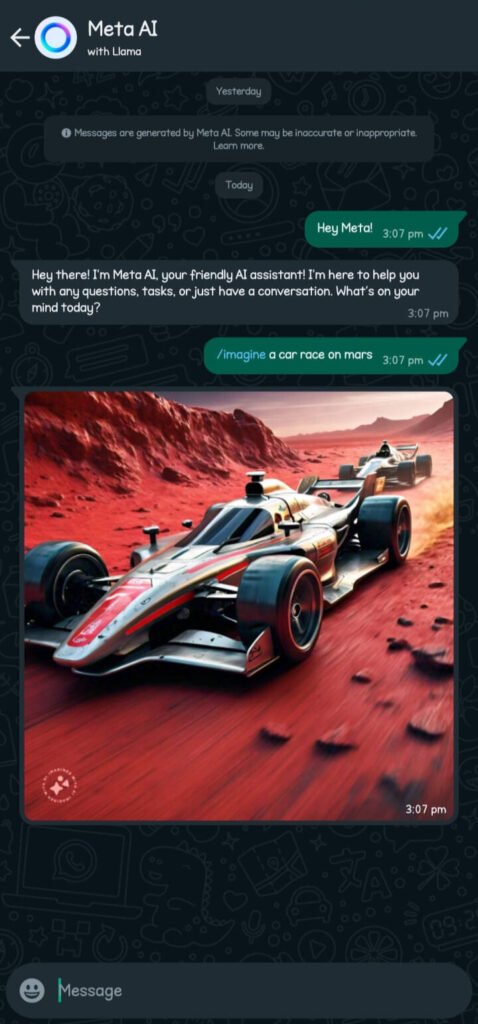
- Generate AI Images: Unleash your inner artist! Meta AI can create unique images based on your descriptions.
Ready to Chat and Create? A Step-by-Step Guide
Now that you’re excited to chat with Meta AI and explore its image generation capabilities, let’s get you started! Here’s a simple step-by-step guide:
1. Ensure Compatibility:
While the feature is rolling out gradually, most users with the latest version of WhatsApp should have access to Meta AI.
2. Open a Group Chat:
Meta AI currently functions within group chats only. Open a new group or an existing one where you feel comfortable using the AI feature.
3. Summon the AI:
Type “@Meta AI” in the chat message bar. You’ll see the AI’s name and icon appear above the message field.
4. Read and Accept Terms (if prompted):
The first time you use Meta AI, you might be prompted to read and agree to the terms of service for this feature.
5. Ask Your Question, Give Your Prompt, or Generate an Image:
Once you’ve completed the previous steps, you’re ready to interact! Here’s how to leverage the two main functionalities:
- For Questions or Prompts: Type your question, prompt, or request clearly and directly to Meta AI. Meta AI will analyze your input and respond accordingly, providing information, generating creative text formats, or engaging in casual conversation.
- For Generating AI Images:
- Open the chat where you want to generate the image.
- Type “@” in the message field and select “/imagine”.
- Enter a text prompt describing the image you want to create. Be as specific as possible with details like colors, objects, and overall style.
- Send the message, and Meta AI will generate an image based on your description.
6. Let the Conversation (and Creativity) Flow!
Meta AI will analyze your input and respond accordingly. Whether it’s providing information, generating creative text formats, or creating unique images based on your descriptions, Meta AI will do its best to fulfill your request.
Things to Keep in Mind:
- Meta AI is still under development. While it’s impressive, it may not always understand your prompts perfectly. Be patient and clear in your communication for both questions and image descriptions.
- Meta AI can only access information publicly available on the internet. Don’t expect it to have access to private data or confidential information for answering questions.
- Meta AI responses and generated images are visible to everyone in the group chat. Choose your prompts and questions wisely, considering the group dynamics.
- For image generation, the more detailed your description, the better the results.
Embrace the Future of Communication and Artistic Exploration!
Chatting with Meta AI on WhatsApp is a glimpse into the future of human-computer interaction. It’s a fun, educational, and potentially useful tool to add to your WhatsApp experience. So, why not give it a try? You might be surprised at the possibilities this innovative AI unlocks!