


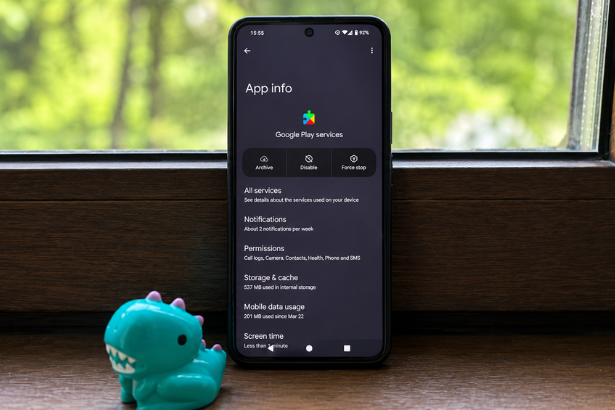
Google’s latest Android changes are putting Google Play services back in the spotlight as new backup policies and battery discussions spark widespread interest.
Google Play services has become one of the most searched Android topics after Google announced significant changes to how Android device backups count toward Google Account storage. At the same time, users have been discussing battery life improvements after disabling certain Google applications, leading many Android owners to question exactly what Google Play services does and whether it affects device performance.
Although these stories are unrelated, together they have fueled a spike in Google Trends as Android users search for answers about storage limits, battery drain, and system updates.
Background and Context
Google Play services is one of the most important components of Android. Unlike a traditional app, it operates behind the scenes, providing APIs and services that allow applications to communicate with Google services without requiring a full Android operating system update.
It powers features including:
- Google Sign-In
- Google Maps integration
- Location services
- Push notifications
- Find My Device
- Google Wallet
- Play Protect security scanning
- Device synchronization
- Backup and restore
Because it updates independently through the Google Play Store, Google can introduce new features and security improvements much faster than waiting for smartphone manufacturers to release operating system updates.
For most Android users, Google Play services runs continuously in the background, making it one of the most essential system components on certified Android devices.
Google Announces Android Backup Storage Changes
The biggest news driving Google Play services searches is Google’s updated Android backup storage policy.
Beginning later this year, Android device backups will count toward the storage available in users’ Google Accounts.
Previously, Android backups were largely exempt from Google Drive storage quotas.
Under the new policy, backups stored through Android will use available cloud storage, meaning users with free 15 GB Google accounts may need to manage their storage more carefully if they regularly back up multiple devices.
Google says the change is intended to simplify storage management by placing backups alongside photos, Gmail, Drive files, and other cloud content under a single storage allocation.
For users already approaching their storage limits, older backups may eventually need to be deleted or additional Google One storage purchased.
The company has started notifying Android users about the upcoming transition through emails and system notifications.
What Data Is Included in Android Backups?
Android backups typically include:
- App data
- SMS messages
- Call history
- Device settings
- Wi-Fi passwords
- Wallpapers
- Certain app preferences
- Contacts (if synced)
- Calendar information
Photos and videos stored in Google Photos continue following their existing storage rules.
Large media libraries remain the biggest contributor to cloud storage usage.
Why Battery Life Is Also Trending
Another reason Google Play services has appeared in Google Trends stems from a widely shared user experience involving Google’s Discover feed.
A technology writer recently reported gaining nearly two hours of battery life after disabling the Google app’s Discover page and reducing background activity.
It’s important to note that this does not mean Google Play services itself is responsible for excessive battery drain.
Instead, battery consumption varies depending on:
- Background location usage
- Google Assistant activity
- Synchronization frequency
- Push notifications
- Widget refresh intervals
- Device manufacturer optimizations
For most users, Google Play services appears near the top of battery statistics because many Android features rely on it throughout the day.
That doesn’t necessarily indicate abnormal battery usage.
Understanding Google Play Services
Many Android users confuse Google Play services with the Google Play Store.
They perform very different functions.
Google Play Store
- Downloads applications
- Updates installed apps
- Manages purchases
Google Play Services
- Supports applications
- Provides Google APIs
- Enables notifications
- Handles authentication
- Improves device security
- Delivers background updates
Without Google Play services, many Android applications would lose significant functionality.
Expert Analysis
Google’s storage policy reflects the growing demand for cloud storage as smartphones continue generating larger amounts of personal data.
Android backups have steadily increased in size due to richer app data, higher-resolution settings, and expanded system customization.
Bringing backups under Google Account storage creates a more transparent system, although it may encourage more users to upgrade to Google One subscription plans.
Meanwhile, the discussion surrounding battery life highlights a common misconception.
Battery optimization often depends more on individual usage patterns than any single Google component.
Location tracking, social media synchronization, widgets, and always-on connectivity generally consume considerably more power than Google Play services alone.
Broader Implications
For Android users, the latest updates reinforce two growing trends.
First, cloud storage is becoming increasingly valuable as smartphones generate more data than ever before.
Second, battery optimization continues to balance convenience against power consumption.
Users who prioritize longer battery life may choose to reduce background activity or disable optional Google features, but removing Google Play services entirely is not recommended because many essential Android functions depend on it.
Related Android Developments
Google continues expanding Android’s ecosystem through frequent Play services updates rather than relying solely on major Android operating system releases.
Recent improvements include:
- Enhanced security protections
- Better cross-device connectivity
- Improved wallet functionality
- Stronger malware detection through Play Protect
- Expanded device backup capabilities
This modular update strategy allows Google to deliver new features to billions of Android devices without requiring manufacturer firmware updates.
What Happens Next?
Google will continue rolling out notifications informing users about the new Android backup storage policy before enforcement begins.
Users approaching their storage limits may want to:
- Review existing backups
- Delete unused device backups
- Remove unnecessary Google Drive files
- Clean Gmail storage
- Review Google Photos storage
- Consider upgrading to Google One if additional space is required
Battery-conscious users should monitor Android’s built-in Battery Usage dashboard before disabling any core Google components.
Conclusion
Google Play services remains one of Android’s most important system components, quietly enabling everything from notifications and security updates to device backups and account synchronization.
The recent surge in search interest reflects two separate developments: Google’s new cloud backup storage policy and ongoing discussions about Android battery optimization.
While the storage changes may affect how users manage their Google Accounts, the battery discussions serve as a reminder that optimizing Android performance usually involves adjusting overall device usage rather than removing essential system services.
Frequently Asked Questions
What is Google Play services?
Google Play services is a background system component that provides APIs, security updates, location services, notifications, authentication, and other essential features for Android applications.
Why is Google Play services trending?
It is trending because Google announced that Android backups will begin counting toward Google Account storage, while battery life discussions involving Google’s apps also gained attention.
Does Google Play services drain battery?
Normally, no. Because many Android features rely on Google Play services, it often appears prominently in battery statistics, but that does not necessarily indicate excessive battery consumption.
Can I disable Google Play services?
Disabling Google Play services is not recommended because many Android apps and system functions depend on it.
Will Android backups count toward Google storage?
Yes. Google has announced that Android backups will count toward your available Google Account storage under its updated cloud storage policy.
Sources & References
- Android Authority – Google Starts Informing Android Users About a Major Backup Storage Change.
- 9to5Google – All Android Backup Data Now Counts Toward Your Google Account Storage.
- MakeUseOf – I Turned Off One Google App and Gained Nearly Two Hours of Battery Life.
- Google Support Documentation – Android Backup & Restore.
- Android Developers Documentation – Google Play Services APIs.