

Introduction
Signal blocks AI agents from accessing private conversations in one of the most significant privacy developments involving mobile artificial intelligence this year.
The encrypted messaging platform is introducing new protections designed to prevent AI assistants such as Google Gemini and Apple’s Siri AI from reading information displayed inside its mobile application.
The announcement, published on November 20, 2026, reflects growing concerns about how operating-system-level AI features interact with applications containing sensitive personal information.
Signal’s approach is straightforward, although not without limitations. The company is restricting screenshots on iOS 27 and detecting attempts by AI assistants to access screen content on supported Android devices.
The reason is important.
Modern AI assistants increasingly rely on information displayed on a smartphone screen to understand what users are doing and provide contextual assistance. While that capability can make smartphones more useful, it also creates potential privacy problems when the screen contains encrypted messages, financial information or other sensitive material.
Signal argues that encryption alone cannot protect information after it becomes visible on a user’s device and is subsequently captured by another system.
That creates an uncomfortable situation for privacy-focused applications.
A messaging platform can protect conversations through encryption, but what happens when an operating system’s AI assistant can read the conversation directly from the screen?
Signal wants Apple, Google and Microsoft to provide developers with better controls before this becomes a much bigger problem.
Background and Context: Why AI Agents Are Becoming a Privacy Concern
For years, smartphone applications have operated within the security frameworks provided by their respective operating systems.
Apple controls iOS, Google develops Android, and Microsoft manages Windows.
These platforms provide the underlying environment in which third-party applications operate.
However, the growing integration of AI assistants is changing how operating systems interact with applications.
Traditional digital assistants generally waited for users to provide commands.
Newer agentic AI systems can go further. They can interpret information displayed on a screen, understand the surrounding context and use that information to perform tasks.
For example, a user might ask an AI assistant to:
- Summarize information displayed in an application.
- Identify details from a conversation.
- Extract information from a document.
- Understand what is happening on a webpage.
- Help complete a task using information from multiple applications.
These features can be useful, but they introduce another layer of data access.
If an AI assistant can inspect information displayed inside an application, sensitive content may become available to systems outside that application’s normal privacy protections.
This is particularly concerning for encrypted messaging platforms.
Signal’s position is that users should not have to sacrifice the privacy of their conversations simply because their smartphone operating system introduces new AI capabilities.
Latest Update: Signal Blocks AI Agents From Accessing Screen Content
On November 20, 2026, Signal president Meredith Whittaker published an official announcement explaining the company’s new privacy protections.
The company is introducing restrictions designed to prevent operating-system AI assistants from capturing and processing Signal conversations.
The announcement specifically addresses Apple’s Siri AI and Google’s Gemini.
Signal is implementing different protections depending on the operating system.
iOS 27: Signal Restricts Screenshots
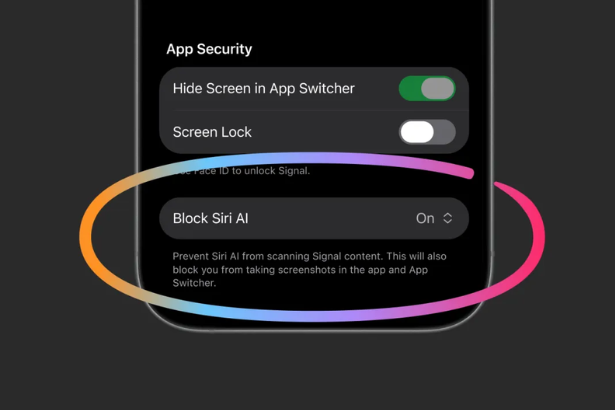
On Apple’s iOS 27, Signal is blocking screenshots within the application by default as part of its privacy protection approach.
The goal is to prevent Siri AI and other operating-system capabilities from capturing information displayed inside Signal conversations.
Users can disable this protection through Signal’s application settings if they want to restore screenshot functionality.
However, Signal warns that doing so could expose the user’s conversations, along with their contacts’ information, to AI systems capable of accessing screen content.
This creates a trade-off between convenience and privacy.
Users who prioritize privacy can keep the protection enabled, while those who require screenshots can choose to disable it.
Android: Signal Detects AI Screen Access
<IMAGE_PLACEHOLDER>
Signal is taking a slightly different approach on Android.
Rather than simply blocking every screenshot across every device, the application attempts to detect when an AI assistant is trying to access screen content.
When this type of access is detected, Signal automatically enables its Screen security setting.
The company explains that Android devices differ depending on the manufacturer and software distribution.
This makes universal screenshot blocking difficult to implement consistently.
Signal also acknowledges that it cannot reliably detect every possible screenshot attempt across all Android devices.
Its approach therefore focuses on identifying AI-related screen access where possible.
What About Mac Users?
There is an important limitation.
Signal says it cannot currently implement equivalent protections on macOS because of restrictions in Apple’s available screen-protection mechanisms and the lack of suitable developer controls.
For macOS 27 users, Signal recommends adding the application to the Excluded Apps section in System Settings under Siri.
This is an important distinction because the new mobile protections should not be interpreted as universal protection across every Signal platform.
Read Signal’s complete announcement:
Signal Is Serious About Protecting Your Privacy.
Why Signal Says AI Agents Threaten End-to-End Encryption
One of the most important parts of Signal’s announcement concerns the difference between encrypted communication and operating-system-level data access.
End-to-end encryption is designed to prevent unauthorized parties, including the service provider, from reading the contents of conversations while they are transmitted between participants.
However, messages must eventually become readable on the devices used by the people communicating.
That creates a potential vulnerability.
If an AI assistant captures information displayed on the screen, the information may become available to another system outside the messaging application’s normal encryption protections.
Signal argues that this can undermine its ability to independently guarantee privacy.
The company also raises concerns about where captured information might be stored or processed.
Depending on the AI system, information could be made available to local databases or remote services.
This does not mean that every AI assistant automatically uploads every message it sees.
Rather, Signal is warning that developers lack sufficient control over how operating-system AI systems access and process application data.
That distinction matters.
The concern is not simply that AI exists on smartphones. It is that applications cannot always determine what happens to sensitive information after another system gains access to it.
The Microsoft Recall Connection: Signal Has Faced This Problem Before
This is not Signal’s first attempt to prevent an AI system from capturing private conversations.
The company previously introduced screenshot-blocking protections against Microsoft’s Recall feature on Windows 11.
Microsoft Recall was designed to capture periodic screenshots of activity on a computer, extract text using optical character recognition and create a searchable record of what users had been doing.
For Signal, this raised a serious privacy concern.
A disappearing message or encrypted conversation could potentially become part of a searchable collection of screenshots.
Signal therefore implemented protections to prevent Recall from capturing its secured conversations by default.
The mobile AI controversy follows a similar pattern.
The underlying issue is that AI systems increasingly rely on information from the applications people use every day.
Signal believes application developers need the ability to prevent sensitive content from being captured without having to compromise the core functionality of their products.
Meredith Whittaker’s Warning: AI Operating Systems Need Better Privacy Controls
<IMAGE_PLACEHOLDER>
Signal president Meredith Whittaker has been particularly critical of the way operating-system AI capabilities are being introduced.
In her November 20 announcement, she argued that developers currently lack robust tools to prevent AI agents from accessing sensitive application data.
Her criticism focuses on three major technology companies:
- Apple.
- Google.
- Microsoft.
Signal wants these companies to provide simple, well-documented mechanisms that allow applications to opt out of AI data access.
The request goes beyond screenshot blocking.
Signal specifically identifies several potential access points:
- Screen reading and screenshot capture.
- Filesystem access.
- Notifications.
- Operating-system APIs.
- Other system-level frameworks.
The company argues that developers should be able to prevent AI agents from accessing sensitive information through these mechanisms without destroying the application’s normal functionality.
It also wants operating-system companies to publish accurate documentation explaining how their AI systems interact with application data.
This is a significant request because developers cannot reliably defend against access mechanisms they cannot properly understand.
Expert Analysis: Is Signal Right to Block AI Agents?
Signal’s decision raises a bigger question for the technology industry.
Should smartphone operating systems be allowed to access information displayed inside applications to provide AI-powered assistance?
There are reasonable arguments on both sides.
1. AI Assistants Need Context to Be Useful
Modern AI assistants are designed to understand what users are doing.
Screen awareness can make these tools more useful because users do not need to repeatedly explain the information they want analyzed.
For example, an assistant that can interpret an open document or webpage can respond more effectively than one that only receives a short voice command.
However, access to contextual information should not automatically mean unrestricted access to every application.
2. Privacy Should Be Controlled at the Application Level
Signal believes application developers should have a straightforward way to prevent AI systems from accessing sensitive data.
This would give privacy-focused services more control over their security guarantees.
It could also establish a consistent standard across different operating systems.
Without these controls, developers may have to build their own detection systems and work around platform limitations.
3. Screenshot Blocking Is Not a Complete Solution
Signal openly acknowledges that its current approach is incomplete.
Blocking screenshots does not prevent every possible form of AI access.
For example, an AI agent could potentially retrieve information through a device’s filesystem or other operating-system permissions.
This means screenshot restrictions should be considered one layer of protection rather than a complete security solution.
4. Convenience and Privacy Will Increasingly Compete
The smartphone industry is moving toward more proactive AI assistants.
These systems are expected to understand user activity and complete tasks with less manual input.
But the more information they can access, the more important data-control mechanisms become.
The challenge for Apple, Google and Microsoft will be allowing useful AI features without making privacy-sensitive applications dependent on workarounds.
EFF’s Position: Users Need the Ability to Exclude Apps From AI
The Electronic Frontier Foundation has also been advocating for stronger user controls over AI access.
In an October 2026 update, the organization welcomed Apple’s introduction of an Excluded Apps setting in iOS 27.2.
The setting allows users to prevent Siri AI from accessing selected applications.
According to EFF, users can find the feature under:
Settings > Siri > Excluded Apps
Users can then select applications they do not want Siri AI to access.
There is an important trade-off.
When an application is excluded, some AI features stop working with that application.
For example, Siri may no longer be able to interpret information from an excluded application using its onscreen awareness feature.
EFF considers that an acceptable compromise because users should be able to decide whether they value additional AI functionality or stronger privacy restrictions.
The organization also notes that Android offers some controls over Gemini’s access to connected applications, although the controls are less straightforward and do not provide the same per-application screen-context exclusion.
Read the Electronic Frontier Foundation’s explanation of Apple’s new Siri AI exclusion controls.
Broader Implications: The Future of AI and Smartphone Privacy
Signal’s announcement is about more than screenshots.
It highlights a fundamental challenge facing the next generation of operating systems.
For years, application security has focused on controlling what individual apps can access.
AI agents introduce another dimension because they can interpret information across different parts of a device.
This could change how privacy works on smartphones.
1. Encrypted Messaging Applications Could Demand New Standards
Signal is not the only service with an interest in protecting private conversations.
Other messaging applications and financial services could face similar questions as operating-system AI capabilities expand.
Developers may increasingly demand controls that prevent operating-system assistants from accessing sensitive content.
2. Apple and Google May Need Better Developer Tools
Signal wants operating-system providers to create standardized mechanisms for restricting AI access.
This could eventually lead to clearer permissions for screen reading, notifications and application data.
It would also make privacy protections easier to implement across different devices.
3. AI Convenience Could Become a Privacy Decision
Consumers may eventually have to choose between allowing an assistant to understand everything happening on their device and keeping certain applications completely outside its reach.
That is a significant change in the smartphone experience.
AI functionality may no longer be something users simply enable or disable globally.
Instead, privacy controls could become application-specific.
4. The Definition of End-to-End Encryption Could Face New Questions
End-to-end encryption remains an important security technology.
However, Signal’s warning demonstrates that encrypted transmission is only one part of protecting sensitive information.
Device-level access, notifications, screenshots and local storage also matter.
The broader industry will need to address these issues as AI systems become more deeply integrated into operating systems.
For more reporting on artificial intelligence, digital privacy and cybersecurity, explore The Tech Marketer.
Related History: From Microsoft Recall to AI-Powered Smartphones
The current controversy is part of a longer evolution in the relationship between artificial intelligence and personal data.
Microsoft Recall
Microsoft Recall brought the issue of continuous screen capture into the mainstream technology conversation.
Its ability to capture and index user activity raised questions about whether personal information could become searchable without users fully understanding the consequences.
Signal responded by introducing protections against Recall capturing its messages.
Apple’s Onscreen Awareness
Apple’s newer Siri AI capabilities introduce another version of the same debate.
An assistant that understands what is displayed on the screen can provide more contextual help.
But applications containing sensitive information need ways to restrict that access.
Google’s Gemini Integration
Google’s Gemini ecosystem also includes capabilities that use screen context and connected applications.
These features can improve productivity, but they create additional questions about notifications, application permissions and user consent.
Signal’s Latest Response
Signal’s latest protections demonstrate how application developers may respond when operating-system AI capabilities expand faster than privacy controls.
Instead of waiting for a universal solution, the company is introducing restrictions within its own application.
The long-term question is whether other developers will follow the same approach.
What Happens Next?
Several developments will determine how this privacy debate evolves.
1. Apple, Google and Microsoft Face Pressure From Developers
Signal is calling on the three major operating-system providers to create better tools and documentation.
The company says it is engaging with technology providers about improving how AI systems interact with privacy-sensitive applications.
2. More Applications Could Introduce AI Restrictions
If operating-system AI systems continue expanding their screen-reading capabilities, other developers may introduce similar restrictions.
Messaging, banking and password-management applications could have particularly strong reasons to protect their content.
3. Android Privacy Protections May Become More Consistent
Signal says Android device differences make universal protection difficult.
More standardized APIs and manufacturer support could improve the situation.
4. Apple Could Expand Application Exclusion Controls
The EFF has welcomed Apple’s Excluded Apps setting.
Further improvements could give users more granular control over which applications Siri AI can access.
5. The Industry Needs a Standard for AI Data Access
Signal’s central request is for standardized developer controls.
If technology companies agree on common mechanisms, applications may be able to protect sensitive information without introducing disruptive restrictions.
That would benefit both developers and users.
How to Protect Your Signal Messages From AI Access
Signal has introduced protections, but users should understand the available controls.
Here are several practical steps.
1. Keep Signal’s screenshot protection enabled.
Avoid disabling the protection unless you specifically need screenshot functionality.
2. Review Signal’s Screen Security settings on Android.
Check the application’s security settings and understand when AI-related screen protection is activated.
3. Review Apple’s Siri AI exclusions.
On supported iOS versions, users can review the Excluded Apps setting under Settings > Siri.
4. Review Gemini’s connected applications and screen-context permissions.
Android users can review Gemini’s Personal Intelligence and screen-context controls.
5. Check notification access.
AI assistants may have access to information through notifications, depending on the device and permissions configured.
6. Keep your operating system and messaging application updated.
Security protections can change as developers introduce new safeguards.
These measures do not guarantee that every possible access route is blocked, but they help users make more informed privacy decisions.
Conclusion
Signal blocks AI agents because the company believes encrypted messaging applications should retain control over the sensitive information displayed inside them.
Its new protections on iOS 27 and supported Android devices are a direct response to the growing ability of operating-system assistants to inspect screen content.
The move also highlights an important limitation of traditional encryption.
Protecting messages while they travel between devices is not enough if another system can capture them after they appear on the screen.
Signal wants Apple, Google and Microsoft to provide developers with better tools, clearer documentation and consistent ways to restrict AI access.
The company also acknowledges that screenshot blocking is incomplete and cannot address every possible method of data access.
That makes this a much bigger debate than a single messaging application’s security settings.
As AI becomes more deeply integrated into smartphones, users will need greater control over which applications these assistants can see and understand.
The future of mobile AI may depend not only on what these assistants can do, but also on what users can prevent them from accessing.
Frequently Asked Questions
1. Why is Signal blocking AI agents?
Signal is blocking certain forms of AI screen access because it believes operating-system assistants could capture sensitive messages and other application information, potentially undermining application-level privacy.
2. Does Signal block Google Gemini?
Signal is introducing protections designed to prevent Gemini from accessing its screen content through AI screen-reading mechanisms on supported Android devices.
3. Does Signal block Apple’s Siri AI?
Yes. Signal is introducing screenshot restrictions on iOS 27 to prevent Siri AI and other system-level capabilities from capturing information displayed inside the application.
4. Can users still take screenshots in Signal?
Yes. Users can disable the screenshot protection through Signal’s application settings. However, the company warns that doing so could expose private conversations to AI agents capable of accessing screen content.
5. Does Signal block AI agents on Android?
Signal attempts to detect when an AI assistant is accessing screen content on supported Android devices and automatically enables its Screen security setting. Protection varies across Android devices.
6. Does Signal block AI access on Mac?
Signal says it cannot currently implement equivalent screenshot protections on macOS. It recommends adding Signal to the Excluded Apps section in System Settings under Siri on macOS 27.
7. Does screenshot blocking guarantee complete privacy?
No. Signal acknowledges that AI systems could potentially access application data through other methods, including the device filesystem.
8. What is Meredith Whittaker asking Apple and Google to do?
She wants operating-system companies to provide straightforward developer controls that prevent AI agents from accessing sensitive application information, alongside accurate technical documentation.
9. What is Apple’s Excluded Apps feature?
It is an iOS 27.2 setting that allows users to prevent Siri AI from accessing selected applications. The feature was welcomed by the Electronic Frontier Foundation.
10. Will other messaging applications block AI agents?
That remains uncertain. However, Signal’s announcement highlights a privacy challenge that could affect other messaging services and applications containing sensitive information.
Sources & References
- The Verge: Signal Is Blocking Gemini and Siri AI From Reading Your Screen. November 20, 2026.
https://www.theverge.com/ai-artificial-intelligence/1038390/signal-blocking-ai-agent-screenshots-mobile-app - Signal Official Blog: Signal Is Serious About Protecting Your Privacy. Meredith Whittaker, November 20, 2026.
https://signal.org/blog/protecting-your-privacy/ - Electronic Frontier Foundation: Victory! You Can Now Exclude Apps from Siri AI. October 2026.
https://www.eff.org/deeplinks/2026/10/victory-you-can-now-exclude-apps-siri-ai - Apple Developer Documentation: Screen Capture Protection.
https://developer.apple.com/documentation/ - Google Gemini Help: Manage Connected Apps and Personal Intelligence.
https://support.google.com/gemini/