


Introduction
The Apple Screen Time overhaul in iOS 27 was supposed to make parental controls easier to understand and more useful. Apple introduced a redesigned interface, new time allowances, schedules, communication protections, and tools such as Ask to Browse. But for some families, actually activating those features has become a technical obstacle course. The Verge
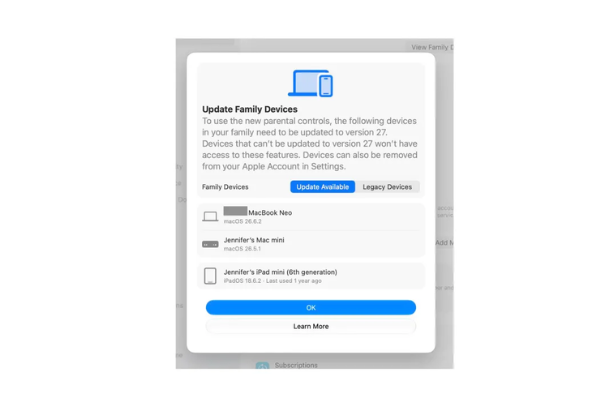
The Verge’s Jennifer Pattison Tuohy documents one particularly frustrating example: her daughter’s iPhone cannot access the revamped Screen Time experience because another family member’s MacBook has not been updated. Other problems include outdated devices that remain attached to an Apple Account, software versions that Apple incorrectly reports, and delays after devices are updated. The Verge
Apple acknowledges that some families are experiencing delays and says it is working to improve the rollout. The Verge
Background and Context
Apple introduced Screen Time in 2018 as a way for parents and users to understand and manage device usage. Over time, it became an important part of Family Sharing, allowing parents to manage app access, communications, content restrictions and time limits across children’s devices.
With iOS 27, Apple attempted a much broader redesign.
The company announced the new parental-control system at WWDC26, describing it as a more intuitive way to manage what children can see, who they can communicate with and when they can use apps. New features include Time Allowances, Schedules, Ask to Browse, expanded Communication Safety and a redesigned Screen Time dashboard. Apple
Apple officially released the new child-safety features on September 14, 2026. The company says the new experience is available through iOS 27, iPadOS 27 and macOS 27, with corresponding updates across watchOS and visionOS. Apple
The catch is the architecture underneath it.
Apple says all devices in a Family Sharing group need to be updated to the relevant version of the operating system to use the new Screen Time experience. Apple
That requirement sounds simple until a family has years of Apple hardware scattered across bedrooms, backpacks, drawers and old device lists.
Latest Update or News Breakdown
The immediate problem is not that Apple’s new parental controls lack features.
It is that the path to those features can be surprisingly complicated.
The Verge reports that every iPhone, iPad, Apple Watch, Mac and Vision Pro in a Family Sharing group needs to be updated to the relevant version 27 software before the redesigned Screen Time can be used. The Verge
Apple’s own support documentation confirms the central requirement. To access the updated parental controls, Apple says families should update devices in their Family Sharing group to iOS 27, iPadOS 27, macOS 27, watchOS 27 and visionOS 27 as applicable. Apple Support
There is a practical complication, however.
Not every Apple device can run the new software.
Apple’s support documentation says families can identify devices that cannot be updated under the Legacy Devices section. Those devices can continue using the previous version of Screen Time and Family Sharing settings. Apple Support
That distinction matters because The Verge’s experience suggests the transition can still be confusing. The article describes legacy devices remaining associated with an Apple Account, devices appearing with outdated software information and a delay between completing updates and gaining access to the new Screen Time controls. The Verge
In one case, removing an apparently obsolete iPad from the Apple Account eventually allowed the new Screen Time option to appear.
Apple says the redesigned Screen Time uses a completely redesigned iCloud architecture, which helps explain why the company requires the family ecosystem to be brought onto the newer software. The Verge
But an architectural explanation does not necessarily translate into a good consumer experience.
Apple’s response
Apple spokesperson Katie Lowry acknowledged that some families are seeing delays and said the company is continuing to improve the rollout. The Verge
That response is important because it distinguishes between a deliberate compatibility requirement and problems with the rollout itself.
The requirement for updated devices is official.
The confusion around devices that appear updated but are not recognized correctly, legacy hardware and activation delays appears to be part of the implementation problem.
Read the original analysis at The Verge
Expert Insights or Analysis
The interesting thing about Apple’s Screen Time problem is that it exposes a fundamental tension in modern ecosystems.
Apple’s biggest strength is also creating the headache.
The company has built a deeply integrated hardware and software environment in which an iPhone, Mac, iPad, Apple Watch and Vision Pro can participate in the same family account. That integration makes centralized parental controls possible.
But it also means a forgotten device can become part of the equation.
A parent may think:
I want to change my daughter’s iPhone settings.
Apple’s architecture may effectively think:
First, let’s verify every relevant device associated with this family.
That is technically coherent. It is not necessarily intuitive.
The problem becomes particularly pronounced in families that recycle hardware.
An older iPhone gets handed to a child. An iPad moves from one family member to another. A Mac gets replaced but remains associated with an Apple Account. An Apple Watch sits unused in a drawer.
None of that is unusual.
In fact, Apple’s ecosystem encourages exactly this kind of device longevity and hand-me-down behavior.
The new Screen Time architecture therefore runs into a real-world household pattern that is difficult to model cleanly.
Broader Implications
Apple’s parental-control redesign is important because parental controls are increasingly becoming a platform-level safety feature rather than a niche setting.
Parents want to manage more than simple daily screen limits.
They want to control websites, apps, communications, content and schedules. Apple’s new system attempts to address all of those areas.
Apple’s September release introduced Ask to Browse, which lets parents require approval before children access new websites in Safari. Time Allowances provide category-level controls for areas including Entertainment, Games and Social Media. Communication Safety has also been expanded to address violent and graphic content in shared images and videos. Apple
Those are meaningful improvements.
The problem is that safety tools have unusually high expectations for reliability.
If a music recommendation fails, a user can move on.
If a parental-control setting fails, a parent may believe a restriction is active when it is not.
That makes clarity and predictable synchronization especially important.
Apple has also partnered with the American Academy of Pediatrics on a guide for building healthier digital habits, emphasizing that technology management is not simply about imposing arbitrary limits. The guidance addresses screen use alongside sleep, exercise, schoolwork and family time. Apple
That broader approach makes the reliability problem even more significant. Apple is positioning Screen Time as part of a family’s long-term digital habits, not merely a collection of technical restrictions.
For more analysis of how Apple is changing the relationship between families and consumer technology, see The Tech Marketer’s Apple coverage.
Related History or Comparable Technologies
Apple’s Screen Time experience has had a long history of synchronization complaints and workarounds.
The Verge’s report notes that users have previously encountered problems involving settings failing to synchronize reliably, contact management and remotely applied time limits. Children have also found ways around restrictions using online guides, videos and simple trial and error. The Verge
The iOS 27 redesign is therefore not starting with a blank slate.
It is attempting to rebuild an existing system that families already depend on.
That creates an unusual product-design challenge.
Apple needs to introduce a more sophisticated architecture without making existing families feel as if their carefully configured household has suddenly become a migration project.
There is also a wider lesson for other technology companies.
As ecosystems become more interconnected, the number of dependencies behind a simple consumer feature increases.
A parental-control switch can depend on:
- Family Sharing
- Apple Accounts
- iCloud
- operating-system versions
- device compatibility
- account-level device lists
- synchronization
- child accounts
- regional availability
The interface may contain one button.
The infrastructure behind that button can be enormous.
What Happens Next
Apple’s immediate challenge is making the new Screen Time experience feel as simple as the company promised.
The company says it is working to resolve delays, so future updates could reduce the activation problems described by early users. The Verge
For families trying to transition now, Apple’s official guidance provides an important fallback: if some devices cannot be updated, users can continue with the previous Screen Time experience or adjust parental controls directly on the child’s device. Apple Support
That means parents do not necessarily have to abandon parental controls simply because an older device cannot run the new system.
The bigger question is how Apple handles mixed-device households over time.
A family with a new iPhone and an older iPad is normal.
A family with a teenager who has an old Mac is normal.
A family with several generations of Apple Watches and iPads is normal.
If Apple’s redesigned Screen Time becomes difficult whenever those devices coexist, the company risks turning one of its most important family-safety features into an administrative chore.
Apple has spent years selling ecosystem integration as a benefit.
With Screen Time, it now has to prove that the same integration can work for families rather than against them.
Conclusion
The new Apple Screen Time experience is a classic example of a promising technology upgrade colliding with the messy reality of people’s homes.
Apple has added genuinely useful parental-control features, including Time Allowances, Schedules, Ask to Browse and expanded Communication Safety. The company also redesigned Screen Time around a more centralized experience. Apple
But accessing those features can require families to update every relevant device, deal with legacy hardware and wait for changes to propagate.
The Verge’s experience illustrates the frustration particularly well: a parent’s ability to manage one child’s iPhone can become dependent on another family member updating a Mac hundreds of miles away. The Verge
That is more than an annoying software bug.
It is a reminder that the hardest part of connected technology is often not building the feature. It is making the feature behave predictably inside a real household.
Apple’s new parental controls may eventually deliver the simpler experience the company promised.
Right now, for some families, getting there is the hard part.
FAQ
What is wrong with the new Apple Screen Time update?
The main issue reported by The Verge is the complicated setup process. Devices across a Family Sharing group need to meet Apple’s software requirements, while legacy devices and synchronization delays can make activation confusing. The Verge
Does Apple Screen Time require every family device to be updated?
For the new Screen Time experience, Apple says all devices in a Family Sharing group need to be updated to the relevant versions of iOS 27, iPadOS 27, macOS 27, watchOS 27 and visionOS 27. Apple
What happens if a family has an older Apple device?
Apple says devices that cannot be updated can continue using the previous Screen Time and Family Sharing settings. Parents can also adjust parental controls directly on a child’s device. Apple Support
What new features are included in Apple Screen Time?
The redesigned system includes Time Allowances, Schedules, Ask to Browse, expanded Communication Safety protections and an updated Screen Time dashboard showing usage and frequently used apps. Apple
Why did Apple redesign Screen Time?
Apple says the redesign is intended to give parents more flexible and intuitive ways to manage what children can access, who they communicate with and when they use devices. Apple
Is Apple fixing the Screen Time setup problems?
Apple has acknowledged that some families are experiencing delays and says it is continuing to improve the rollout. The Verge
Sources & References
- The Verge: I can’t use Apple’s new Screen Time on my daughter’s iPhone because my son won’t update his MacBook
- Apple Newsroom: Apple’s new child safety features now available
- Apple Support: Set up parental controls to manage your child’s iPhone or iPad
- Apple Newsroom: WWDC26, Apple unveils next generation of Apple Intelligence, Siri AI, powerful parental controls, and an expansive set of software improvements
- Apple Newsroom: Apple and the American Academy of Pediatrics release new guide to help families build healthy digital habits